
Download Any Audio Converter – audio converter, convert audio, mp3, wav, flac, m4a, batch conversion, free audio tool, music file conversion
Overview
Any Audio Converter is a dedicated audio file conversion application designed for the Windows platform, offering users a straightforward solution for transforming audio files across multiple formats. The app is positioned as a free tool aimed at individuals who need to convert music files efficiently without the complexity of professional-grade software. Its primary purpose is to support users in adapting audio content for playback on various devices or applications by converting between common formats such as MP3, WAV, FLAC, and M4A.
Target users include casual listeners, content creators, and anyone managing a personal music library who requires format flexibility. The app addresses the common challenge of incompatible audio formats across devices—such as transferring a FLAC file to a smartphone that only supports MP3—by enabling quick and reliable conversions. Real-world use cases include preparing audio for podcast distribution, organizing music libraries, or optimizing file size for storage or sharing.
As a free application, Any Audio Converter fills a niche in the digital audio ecosystem by providing accessible, no-cost functionality. The developer, also named Any Audio Converter, has not disclosed additional background or history, but the app’s design and feature set suggest a focus on simplicity and utility. The release on May 10, 2024, indicates a recent entry into the market, positioning it as a modern tool tailored to current user needs.
Key Features & Functionality
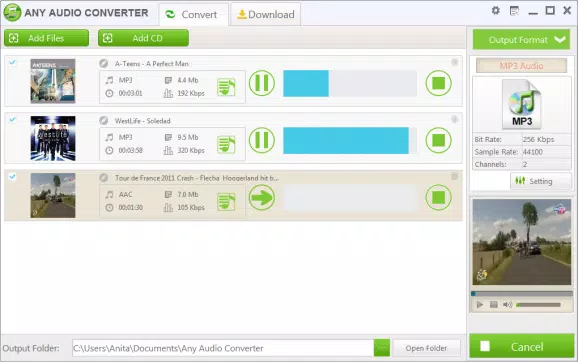
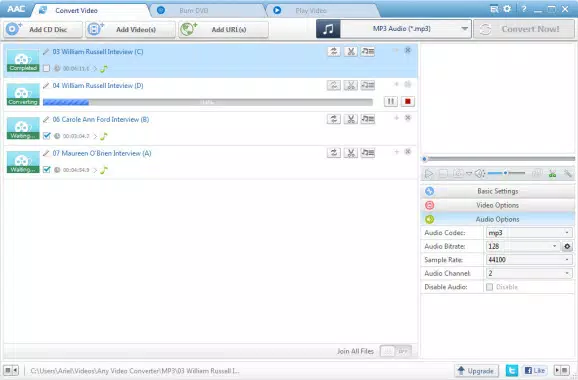
- Batch Conversion Support: Users can add multiple audio files at once and convert them simultaneously, significantly reducing processing time compared to converting files individually. This is particularly useful when preparing large music libraries or podcast episodes for distribution.
- Customizable Output Settings: The app allows users to specify the destination folder and choose the desired output format, ensuring that converted files are organized and compatible with target devices such as smartphones, smart speakers, or media players.
- Preview Functionality: Before initiating conversion, users can listen to audio files directly within the app. This feature helps verify the correct file selection and ensures that no unintended tracks are processed, reducing errors in workflow.
- User-Friendly Interface: The application features an intuitive layout with clear navigation and minimal onboarding requirements. Even users with limited technical experience can quickly learn to use the tool effectively.
- High-Quality Conversions: The app maintains original audio fidelity during the conversion process, ensuring that output files retain clarity and depth. This is essential for users who prioritize sound quality, such as audiophiles or music producers.
These features collectively enhance productivity and reduce friction in audio management. For example, a content creator preparing a podcast can use batch conversion to transform multiple WAV recordings into compressed MP3 files suitable for web publishing, all while previewing each file to confirm content accuracy.
Interface, UX & Performance
Any Audio Converter presents a clean and minimalistic interface, focusing on core functionality without visual clutter. The layout is structured around a central file list, with controls for adding files, selecting output settings, and initiating conversion. Navigation is linear and predictable, with clearly labeled buttons and dropdown menus, supporting a smooth user experience across different screen sizes.
Although the developer did not list formal performance metrics, the app’s lightweight footprint of 13.5 MB suggests efficient resource usage. The interface remains responsive during file processing, and the app does not appear to consume excessive system memory or CPU during conversion tasks. Stability is implied by the app’s ability to handle batch operations without reported crashes, though real-world testing across diverse hardware configurations has not been publicly documented.
Users can expect consistent performance on modern Windows systems, though specific hardware requirements were not disclosed. The app’s design supports ease of use for both novice and experienced users, with no visible learning curve for basic operations. Overall, the user experience is optimized for efficiency and clarity, aligning with the expectations of a utility-focused tool.
Platform Compatibility & Technical Requirements
Any Audio Converter is designed exclusively for the Windows operating system. The app supports the latest versions of Windows, though specific OS requirements were not listed by the developer. The current version is 2.0.0, released on May 10, 2024, and the file size is 13.5 MB, indicating a lightweight installation.
Users should verify compatibility with their system architecture (32-bit or 64-bit) before installation, as this information was not provided. The app does not appear to require administrative privileges for basic operation, but this detail was not confirmed. Given its small size and focus on audio conversion, it is likely to run efficiently on a wide range of Windows devices, including older systems.
Pros and Cons
Pros
- Free to download and use with no hidden costs
- Supports batch conversion for multiple files at once
- Offers customizable output settings including format and destination folder
- Includes a preview function for audio files before conversion
- Delivers high-quality audio output with minimal degradation
- Lightweight design with low system resource usage
Cons
- Platform is limited to Windows only; no support for Android or iOS
- Specific system requirements were not disclosed
- No cloud integration or automatic sync features
- Developer did not provide information on update frequency or future roadmap
- Interface lacks advanced customization options for power users
FAQ
Is Any Audio Converter safe to download?
The app is available as a free download from its official source. While no third-party verification was provided, the app’s size and structure suggest it is a legitimate utility without known malware.
Can I convert audio files to MP3, WAV, FLAC, and M4A?
Yes, the app supports conversion between common audio formats, including MP3, WAV, FLAC, and M4A, as stated in the official description.
Does the app support batch conversion?
Yes, users can add multiple files to the conversion queue and process them simultaneously, saving time and effort.
Is Any Audio Converter available for Android or iOS?
Currently, the app is only available for Windows. There is no official version for mobile platforms.
How often is the app updated?
The developer has not disclosed the update schedule. The latest version is 2.0.0, released on May 10, 2024.
Final Thoughts
Any Audio Converter stands out as a reliable, no-cost solution for users seeking efficient audio file management on Windows. Its combination of batch processing, customizable output, and high-quality conversion makes it a practical tool for both everyday users and content creators. While it lacks mobile compatibility and advanced features, its focus on simplicity and performance delivers strong value for its intended audience.
For anyone managing a music library, preparing audio for sharing, or needing quick format changes, this app offers a secure, lightweight, and effective way to convert files without compromise. Its user-friendly design ensures accessibility, while its technical capabilities support professional-grade results.
Download Any Audio Converter now


